
To sell positions from your portfolio:
-
Go to the "Portfolio" widget.
-
Open the corresponding portfolio from the drop-down list.
-

In the position overview, open the menu via the menu icon in the row with the position to be sold and select the INSTRUMENT, SELL command.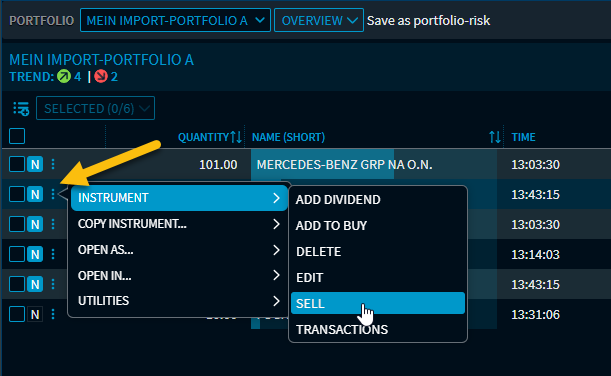
-
In the "Sell" dialogue window, record the transaction data for the sale transaction.
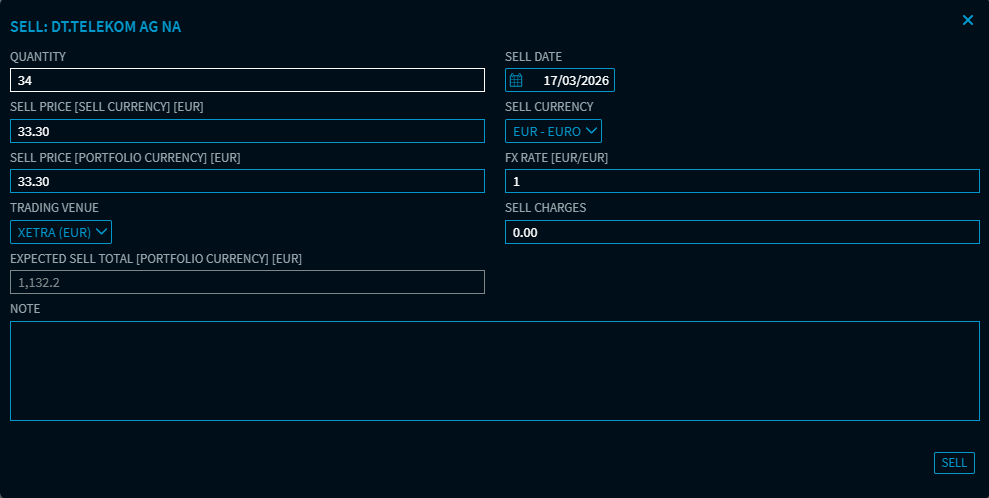
The input fields are similar to those of a purchase and are described in Add position to portfolio. In this case, the charges incurred in the transaction are of course the "Sell charges".
The available number of units is displayed in the "Quantity/Nominal" field. If you enter a higher number of units than available, a warning appears and the sale is not carried out.
-
Complete the sale by clicking the "Sell" button.
The position is deleted from the portfolio or reduced if it is a partial sale.