
If activated, the widget "ESG - Risk" with sustainability data from the Clarity AI source for risk assessment is now available.
Use the quick search for securities and the view drop-down list in the header of the widget of your choice.
"Overview" view
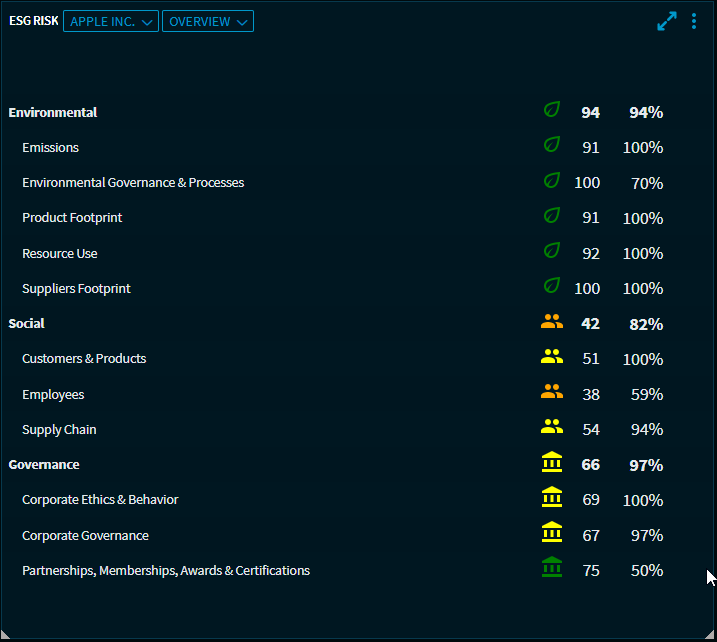
In the default "Overview" view, you will find the security's ESG scores for the following ESG categories:
-
Environment
-
Emissions
-
Resource use
-
-
Social
-
Community and society
-
CSR and sustainability
-
Customers and products
-
Employees
-
Supply chain
-
-
Governance
-
Corporate ethics & behaviour
-
Corporate governance
-
Partnerships, memberships, awards and certifications
-
The colour of the symbols indicates the classification in the corresponding class for the ESG category mentioned.
|
ESG class |
Symbol |
|---|---|
|
Excellent |

|
|
Good |

|
|
Fair |

|
|
Poor |

|
The percentages in the right-hand column show the ESG coverage.
"Chart" view
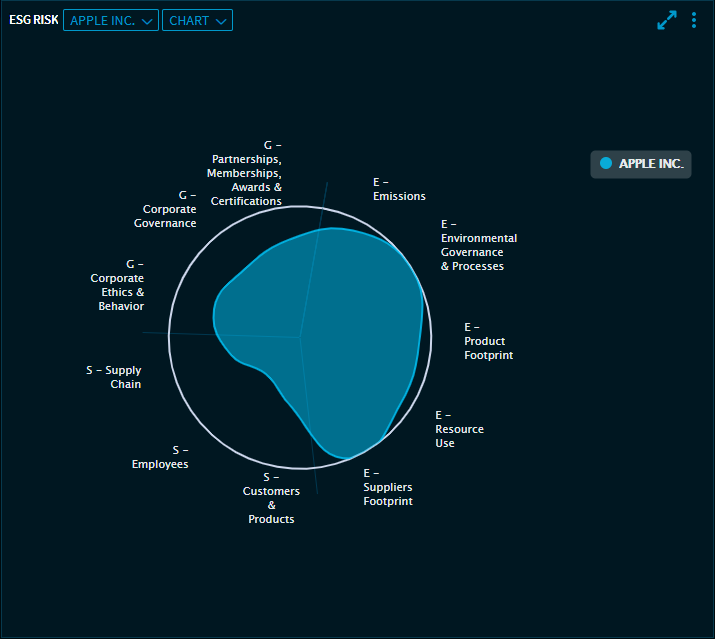
In the "Chart" view, you will find a detailed graphical overview of the ESG scores. The radar chart clearly shows the ESG risk scores for the individual categories. There is one axis for each category: The better values are further away from the centre.
"Summary" view
