
In this widget, you monitor the performance indicators of securities for various periods.
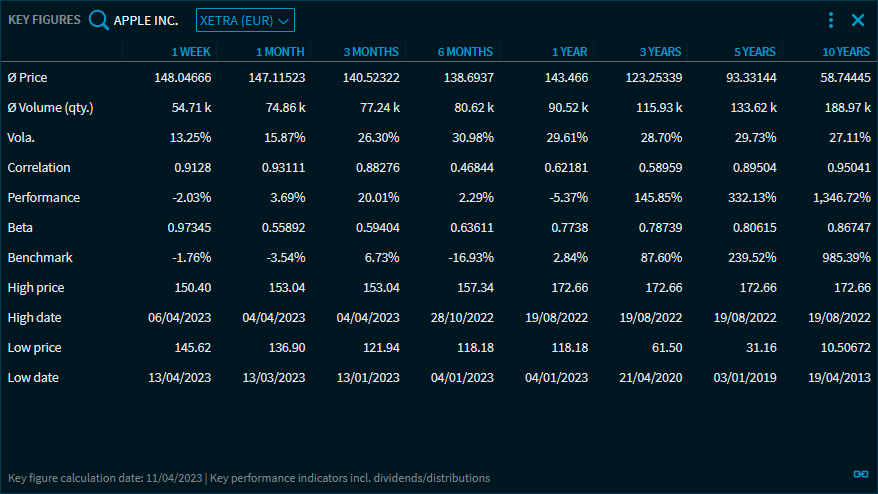
At the top of the "Key Figures" widget, you find the quick search and drop-down lists to select the security and the corresponding trading venue.
The following periods are shown in the table columns, respectively:
-
1 week
-
1 month
-
3 months
-
6 months
-
1 year
-
3 years
-
5 years
-
10 years
For these periods, the following indicators are calculated:
|
ID |
Description |
|---|---|
|
Ø Price |
The average price of the instrument on the trading venue in the corresponding period. |
|
Ø Volume (qty.) |
The average volume of the security on the trading venue in the corresponding period in units (quantity). |
|
Vola. |
The volatility of the security in the corresponding period. |
|
Correlation |
The correlation of the security in the corresponding period. |
|
Performance |
The performance of the security in the corresponding period. |
|
Beta |
The beta of the security in the corresponding period. |
|
Benchmark |
The performance of the benchmark in the corresponding period. In brackets, you see the name of the benchmark. |
|
Price high |
The highest price in the corresponding period. |
|
Date high |
The date at the highest price in the corresponding period. |
|
Price low |
The low price in the corresponding period. |
|
Date low |
The date at the lowest price in the corresponding period. |
|
Footer |
In the footer of the widget, you find the following information:
|
You can open the "Key Figures" widget for all security types showing the corresponding indicators. Widget grouping and drag-and-drop of securities is also supported.