
The "Knock-Out Map" widget shows a grid of tiles, where each tile represents a knock-out certificate. The grid is defined by various pay-off types on the x-axis and knock-out levels on the y-axis. Point to a tile to learn more about a knock-out.
At the top of the widget, select the underlying and the issuer of the knock-outs. The currency of the underlying is shown above the graphic (in the figure, you see the DAX in "points").
If there are no knock-outs for a selected instrument, then a corresponding message is shown in the widget. The drop-down list is hidden in these cases. Only those issuers offering knock-outs for this underlying are shown.
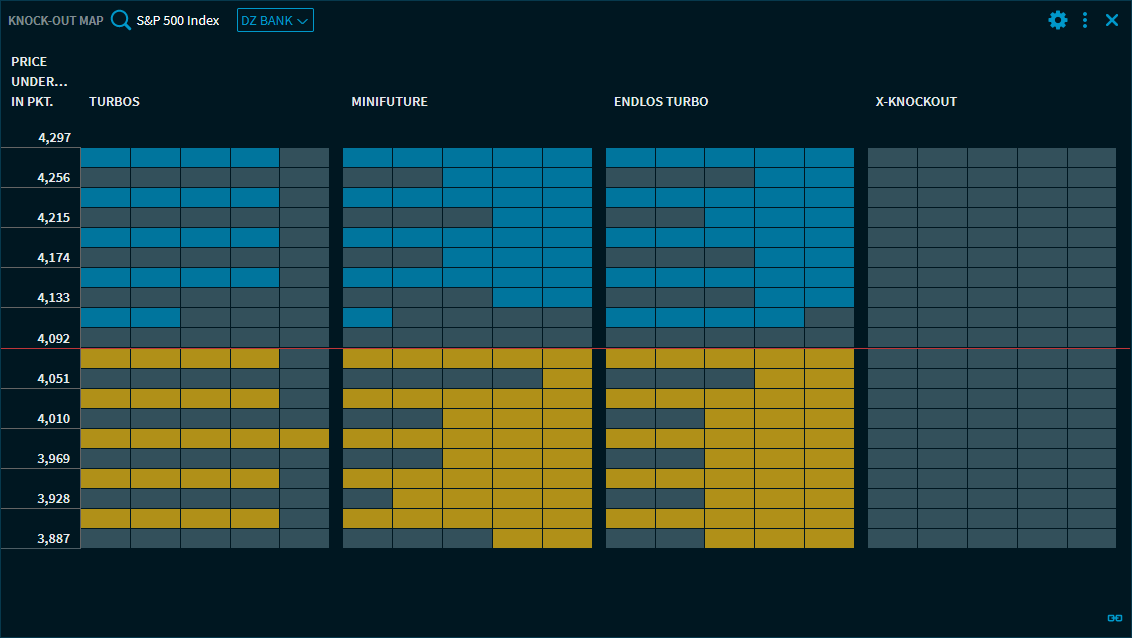
Point to one of the coloured rectangles in the knock-out map to view details about the knock-out. Here, short certificates are shown in blue and long certificates in yellow.
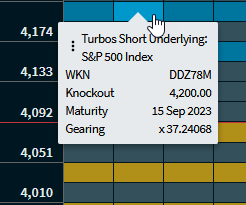
Information in the tooltips
-

Menu icon
In this menu, you find the familiar commands for opening the corresponding certificate in other widgets. For more information, see Commands in the widget menu. -
Knock-out type
-
Underlying
-
WKN
-
Knock-out barrier
-
Maturity date
-
Leverage
In the settings of the widget, you can select the type to be displayed in the columns of the knock-out map.