
When you select the "Cash flow" view from the "Figures" drop-down list, you see all relevant cash flows during the holding period or time to maturity of the bond.
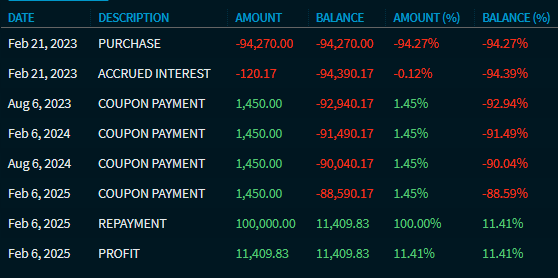
The columns of the "Cash flow" view in detail:
|
Field |
Description |
|---|---|
|
Date |
The date of the corresponding cash flow. |
|
Description |
Short description of the cash flow type, for example purchase, accrued interest, coupon payment and so on. |
|
Amount |
The amount of the payment determined from the nominal amount. |
|
Balance |
The cash flows are summed up in the column. |
|
Amount in % |
The amount in percent. |
|
Balance in % |
The balance in percent. |