
You can add securities of a corresponding vwd page to an existing watchlist of a "Watchlist" widget. To do this, follow these steps:
-
If necessary, open the vwd page.
-
From the "Selected" drop-down list, select the "Add to watchlist" command.
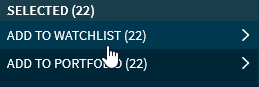
-
Then select the relevant one from the list of your available price lists
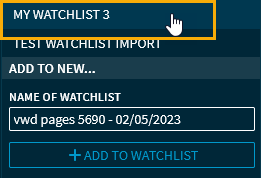
The selected securities are added to this watchlist.
Securities added from a vwd page get the note "Added from security export" in the watchlist.