
At the top of the "Watchlist" widget, you find the drop-down list to select your watchlists.
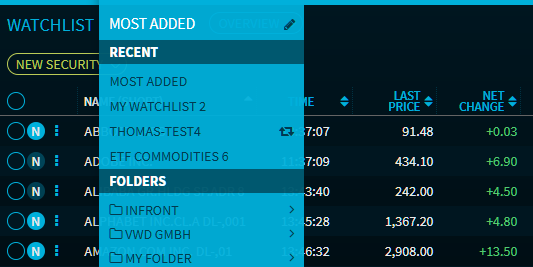
The "Select watchlist" menu provides various functions:
-
At the top of the menu, in the "Last" section, you will find the up to 5 of the most recently opened watchlists for quick selection.
-
In the "Folder" area, you can select and open (as in the Dashboard Explorer) the relevant watchlist from the folder structure. Here, you can also organise your watchlists in a folder structure by creating the corresponding folders in the "Select watchlist" menu by using the "New folder" command. By default, you find your watchlists in the "MeinOrdner" folder.
-
To switch to another watchlist, select it from the corresponding folder in the menu.
-
To create a new watchlist, select the "New watchlist" command on the corresponding folder level.
-
The COPY WATCHLIST command creates a copy of the current watchlist.
-
You can delete created folders and watchlists in edit mode.
For more information about the individual functions and menu structure, see Dashboards.