
Having saved your custom news search (see Save news search), you can delete them it at any time. You can do this in two ways.
Delete news search with drop-down list
You can delete saved news searches directly by using the corresponding drop-down list in the "News Search" widget.
To do this, follow these steps:
-
Open the drop-down list in the upper part of the "News Search" widget.

-
In the open menu, click the "Edit" icon.

A "Delete" icon appears next to each entry. The "Alert" icon is now shown instead of the "Edit" icon.
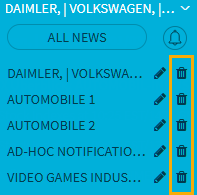
-
Click the "Delete" icon of the entry that you want to delete.
The news search is deleted. Click the "Alert" icon to return to the original display.