

Alternatively, you can use the "Settings" command in the widget menu.
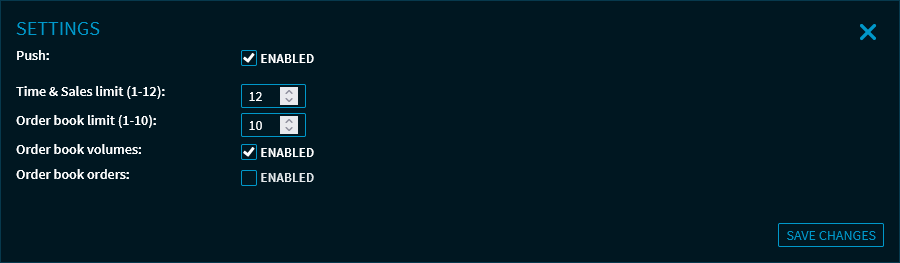
Here, you can make the following settings:
|
Field |
Description |
|---|---|
|
Push enabled |
Use this checkbox to enable or disable the push data feed for this widget. |
|
Time & Sales limit (1-12) |
Specify the number of completed trades to be displayed. You can display up to 12 Time & Sales. |
|
Order book limit (1-10) |
Specify how many bid and ask prices from the order book you want to see. You can show up to 10 of the lowest bid and 10 of the highest ask prices. |
|
Order book volume |
Selected by default. With this checkbox, you can show or hide the display of the order book volume. |
|
Order book orders |
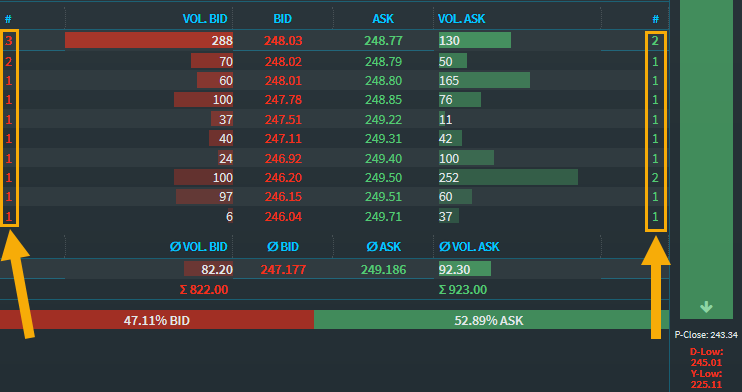
The checkbox is cleared by default. With this checkbox, you can show or hide the display of the order book volume. If the checkbox is selected, then the number of the corresponding orders is shown for the bid and ask price. |
For more information about the widget settings, see Commands in the widget menu.