
Click a table row to open the corresponding recommendation and view all details in the widget.
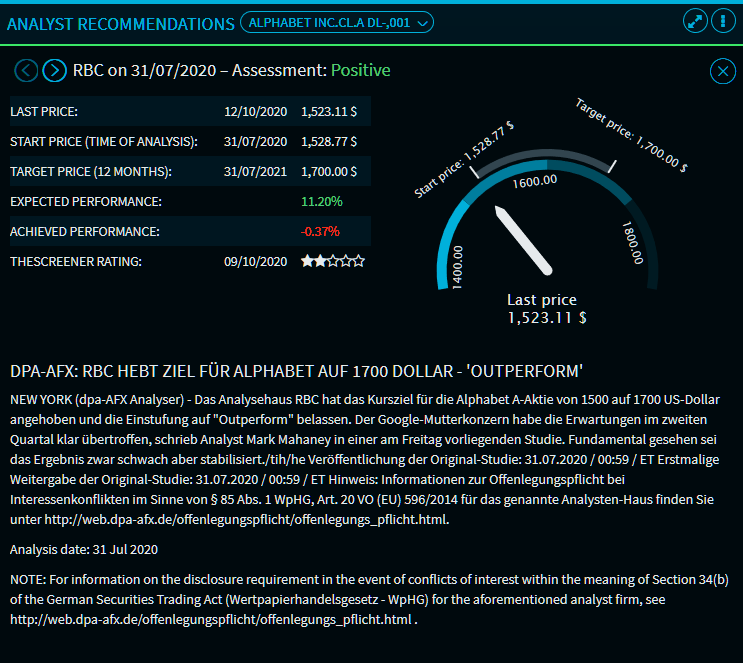
The following functions and data are available in the "Analyst Recommendations" widget:
|
Element |
Description |
|---|---|
|
Select security |
Use the security selection in the upper left corner to search and select another share. Thus, you leave the individual view and return to the default view for the new share. |
|
Source and recommendation |
Below the security selection, you find further information about the financial analyst, analysis date as well as the assessment of the currently selected individual recommendation. |
|
|
Use the navigation arrows to go through the individual recommendations. |
|
Current price |
The current price of the security with price date. |
|
Start price (time of analysis) |
The analysis date including the corresponding price. |
|
Price target (12 months) |
The price target of 12 months after the analysis date. |
|
Expected performance |
The performance expected based on the performance. |
|
Achieved performance |
The performance at the current time since the price analysis time. |
|
theScreener rating |
The number of stars (1 to 5) from the theScreener rating including the rating date. |
|
Graphic |
In the graphic on the right side of the widget, you see a visualisation of the assessments and prices. |
|
Recommendation text |
In the lower part of the widget, you see the complete text of the recommendation. |
|
|
Click this icon to close the individual view in the widget and return to the standard view. |

