
For users with colour vision problems, you can change the default display of Infront Investment Manager to the so-called "Colour Assist". To do this, select the "Colour optimisation" button in the "Design and branding" area in the user settings.

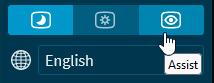
This mode is also useful if the monitor supports only a limit colour range.
Note that it is not possible to select a theme or branding when Colour Assist is enabled. In these cases, you must first switch the Colour Assist "Off".