
As a rule, only technical administrators of Infront Investment Manager can create, edit and delete dashboard templates.
When you Create dashboards, you can specify if the dashboard is to be used as an short portrait dashboard template. To do this, follow these steps:
-
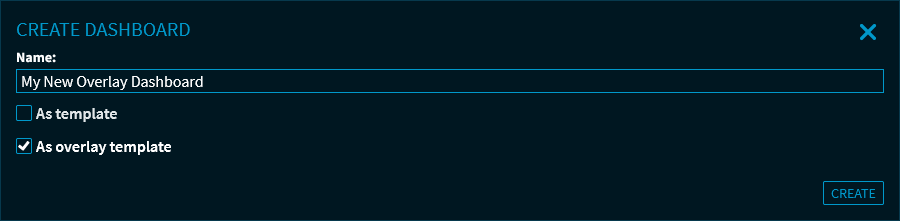
Select the "As short portrait template" option in the "Create dashboard" dialogue window.
-
Then click the "Create" button.
This opens the new short portrait template. -

-
On the right side of the dialogue window, specify the short portrait template options.
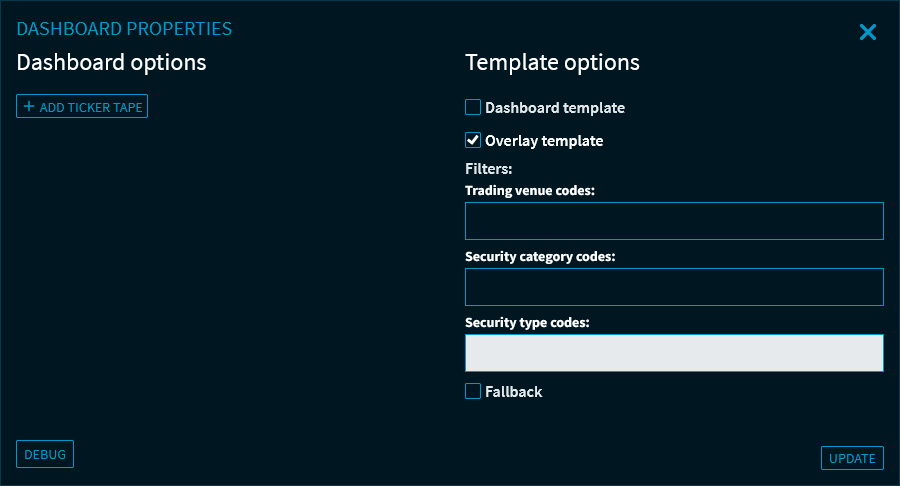
You can specify the following filter settings:Filters
Description
Dashboard template
Check this setting to (also) use the overlay template as a dashboard template.
For more information, see Dashboard templates.
Short portrait template
Enabled for short portrait templates.
Here, you can also use this option to change short portrait templates back into "normal" dashboards or dashboard templates and vice versa.
Trading venue codes
Enter the trading venue ID for the short portrait template, for example "ETR" for Xetra or "STX" for "DJ STOXX".
Security category codes
Enter the security category codes for the short portrait template, for example "Share", "Fund" or "Certificate".
Security type codes
Enter the security type codes to specify the security category for the short portrait template.
Fallback
Select this checkbox to assign the fallback function to this short portrait template.
In the delivery state, the "Overlay Default" short portrait template is enabled by default. Thus, it is used as short portrait template for all instruments that are not assigned to any other available template.
Add ticker tape
With this button, you can embed a
Ticker tapeat the top of the dashboard.
-
Click "Update" button to confirm the settings and closes the dialogue window.
-
Next, open the Widget Gallery to add the corresponding widgets and arrange them accordingly. For more information, see Working with widgets.
-
Combine all widgets on the overlay template into groups. See also Group widgets.
-
Adjust the Dashboard properties to the short portrait template. Based on the settings, the best fitting short portrait template for a security is determined when opening search results (in the screener).